

Peter Drucker, often called the father of modern management, wrote in The Effective Executive: “Time is the scarcest resource, and unless it is managed, nothing else can be managed.”
Your calendar is where that resource gets spent, and for most leaders, other people decide how. Invites land in any open slot, recurring meetings run on long after their purpose fades, and focus time disappears one “quick call” at a time.
A virtual assistant for calendar management puts you back in charge. This guide covers how an executive assistant designs and defends your calendar, the ideas behind good calendar design, a protocol you can hand over on day one, how to manage time zones without mistakes, and how to measure what your meetings really cost.
Quick answer: A virtual assistant for calendar management schedules and reschedules meetings, applies your calendar rules, protects focus time, adds preparation and travel buffers, coordinates across time zones, and audits your calendar each month to cut meetings that no longer earn their place.

Why Does Calendar Management Matter So Much for Leaders?
Leaders spend most of their working life in meetings, and calendars are getting harder to control.
Michael Porter and Nitin Nohria tracked 60,000 hours of activity from 27 CEOs for their study How CEOs Manage Time.
- 62.5 hrsaverage working week for the CEOs studied
- 61%of their working time spent in face-to-face interaction
- 57%of meetings are ad hoc calls with no calendar invite
- +16%rise in meetings held after 8 p.m. in one year
When a calendar fills without a plan, important work slides into evenings, and your time goes to whoever asks first instead of to what matters most. Our CEO delegation matrix shows how to win that time back.
What Is the Maker’s Schedule, and Why Does It Matter?
In 2009, investor and programmer Paul Graham wrote an essay called Maker’s Schedule, Manager’s Schedule. It explains why some meetings feel so much more disruptive than others.
The manager’s schedule
Runs in one-hour blocks. Managers move from meeting to meeting without losing much.
The maker’s schedule
Needs long, unbroken stretches for deep work, such as writing, strategy or building something.
“A single meeting can blow a whole afternoon, by breaking it into two pieces each too small to do anything hard in.”
Most executives live on both schedules at once. They lead people, and they also need time to think. A good calendar assistant guards your maker time and keeps your manager time efficient. Our article on why smart executives work less to achieve more explains why that protected time pays off.
The Executive Calendar Protocol: Rules You Can Hand Over on Day One
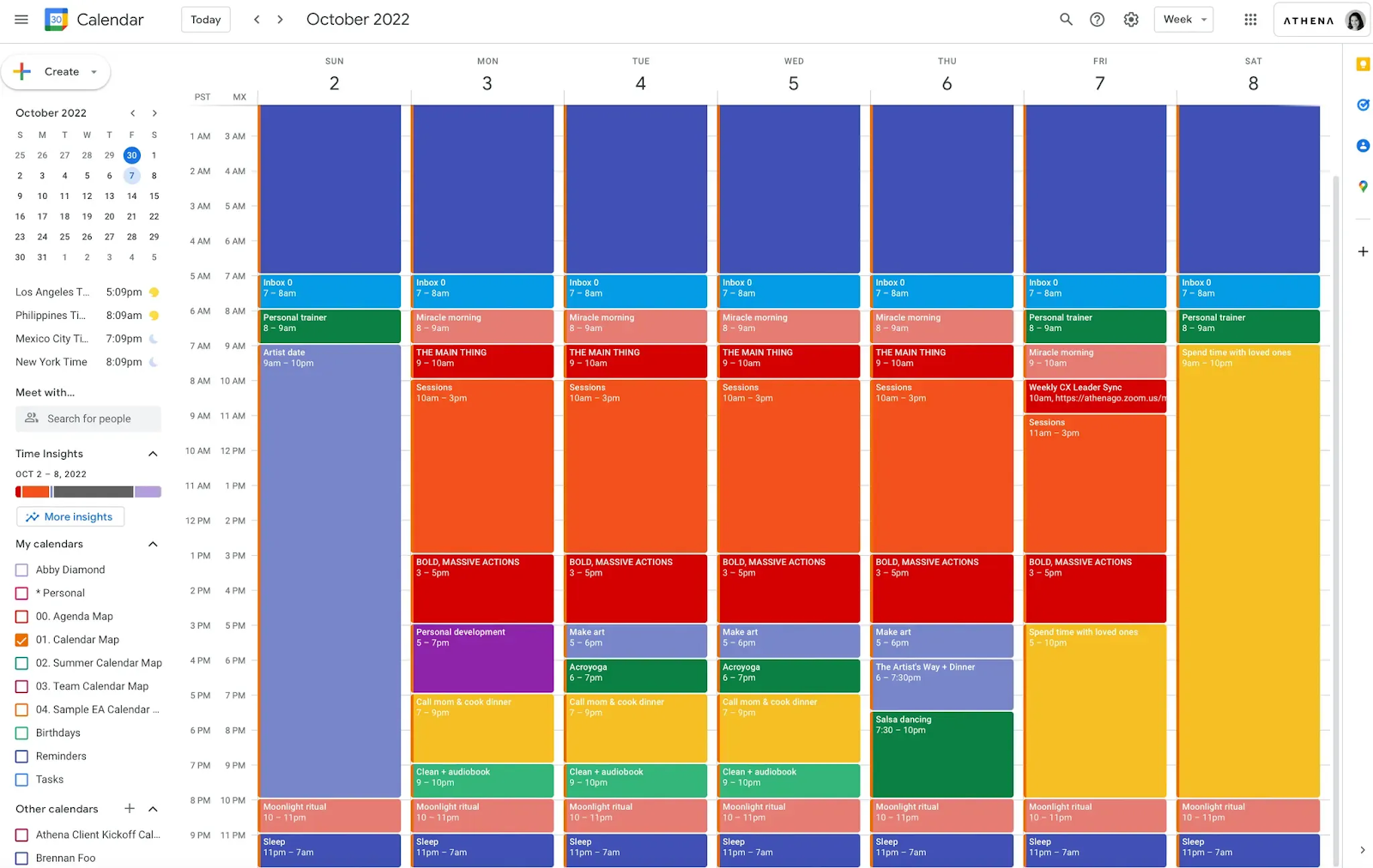
Calendar rules turn your preferences into decisions your assistant can make without asking you. Copy this protocol, change the details to fit your week and share it in your first few days together:
1. Focus protection Protect Tuesday and Thursday mornings (8 a.m. to 12 p.m.) as deep work blocks. Don’t move a focus block unless I confirm on Slack.
2. Meeting length and buffers Book 30-minute requests as 25 minutes and 60-minute requests as 50 minutes. Leave at least 10 minutes between back-to-back external calls. Add 15 to 30 minutes of prep time before any meeting that needs it.
3. Purpose first Every internal meeting request needs a two-sentence goal and an agenda. If it has neither, ask for them before accepting, or place a tentative hold.
4. Batching External calls on Tuesday and Thursday afternoons. Internal meetings on Monday and Wednesday. Keep Friday afternoon free for my weekly review.
5. Who gets a scheduling link Use Calendly or Microsoft Bookings only for first calls with suppliers and routine external consultations. Schedule board members, investors, VIP clients and senior peers personally.
6. Personal time No meetings before 8 a.m. or after 6 p.m. my time, unless I approve. Treat personal blocks (school pickups, training, family dinners) like client meetings.
Review the protocol together after two weeks, then once a quarter. Most executives adjust the batching days and focus blocks as their work changes.
What Does a Calendar Management Assistant Do?
A calendar assistant handles six jobs:
- Scheduling: booking, moving, and confirming meetings with internal and external people.
- Rules: applying your protocol to every request.
- Protection: guarding focus blocks and personal time.
- Buffers: adding prep, travel, and recovery time around meetings.
- Time zones: coordinating across regions without mistakes.
- Audits: reviewing your calendar monthly and cutting what no longer earns its place.
Which Ideas Should Shape Your Calendar Rules?
Behind every good protocol sit a few well-tested ideas.
-
Parkinson’s law
British historian C. Northcote Parkinson observed that work expands to fill the time available for it. Meetings behave the same way. A 60-minute slot invites 60 minutes of discussion.
Calendar ruleDefault to 25 and 50 minutes. It shortens meetings and leaves breathing room between them.
-
Switching costs
Gloria Mark’s research at the University of California, Irvine, found that people take more than 20 minutes on average to return to a task after an interruption. Our guide to email management shows how the same cost builds up in your inbox.
Calendar ruleBatch similar meetings on the same days to cut the number of switches across your week.
Source: Gloria Mark, UC Irvine
-
Chronotypes
Your chronotype is your body’s natural daily rhythm. Some people think best early in the morning, while others peak in the afternoon.
Calendar rulePlace hard thinking in your best hours and routine calls in your lower-energy ones.
-
Decision fatigue
A day of back-to-back decisions leaves people tired and more likely to take shortcuts. Over time, that drain adds to executive burnout.
Calendar rulePut high-stakes meetings earlier in the day, before a long run of smaller calls, so you bring your best judgment to the ones that matter most.
How Does Time Blocking Work in Practice?
Time blocking means planning your week as blocks of time assigned to specific work, instead of a to-do list squeezed between meetings. Computer science professor Cal Newport, author of Deep Work, helped popularize the method.
A weekly block plan might look like this
| Block | When | What happens |
|---|---|---|
| Planning | Monday, first hour | Review priorities and the week ahead |
| Deep work | Tuesday and Thursday mornings | Strategy, writing and key decisions |
| External meetings | Tuesday and Thursday afternoons | Clients, partners and investors |
| Internal meetings | Monday and Wednesday | Team meetings and one-on-ones |
| Admin and email | Two short blocks each day | Approvals and the email summary |
| Weekly review | Friday afternoon | Close loops and plan next week |
How your assistant uses the plan
- Your assistant builds the template, then fills real meetings into the right blocks.
- When a request doesn’t fit, they offer the next slot in the correct block.
Our guide to the daily focus habits of high-performing executives shows how leaders protect these blocks once they’re on the calendar.
How Should Your Assistant Handle Time Zones?
Time zone mistakes cause missed calls, early-morning surprises and awkward apologies. They matter even more when your assistant works from another country, such as South Africa or the Philippines. Here’s how a strong assistant manages them.
1. Know the zones you work across
| Region | Time zone | Offset from UTC | Changes clocks? |
|---|---|---|---|
| South Africa | SAST | UTC+2 | No |
| Philippines | PHT | UTC+8 | No |
| UK | GMT / BST | UTC+0 / UTC+1 | YesLate March and late October |
| Central Europe | CET / CEST | UTC+1 / UTC+2 | YesLate March and late October |
| US East Coast | EST / EDT | UTC−5 / UTC−4 | YesSecond Sunday in March, first Sunday in November |
| US West Coast | PST / PDT | UTC−8 / UTC−7 | YesSecond Sunday in March, first Sunday in November |
UTC (Coordinated Universal Time) is the world’s reference time. Every time zone is described as a number of hours ahead of or behind it.
2. Use dual time zone views
Both main calendar apps can show a second time zone beside your own:
Google Calendar
- Settings
- Time zone
- Display secondary time zone
Outlook
- Settings
- Calendar
- Time zones
- Add a time zone
Set your own time zone as the main one and your assistant’s or key team’s zone as the second. Microsoft’s Scheduling Assistant in Outlook and Google Calendar’s Find a time feature also show attendees’ availability across zones.
3. Watch the clock-change gaps
The US, the UK and Europe change their clocks on different dates, and South Africa and the Philippines don’t change at all. That creates gaps when the usual time difference shifts by an hour:
The US moves its clocks forward two to three weeks before the UK and Europe.
The UK and Europe move their clocks back about a week before the US.
During both windows, a regular 3 p.m. London call with New York moves an hour later for the US team:
Your assistant should flag these windows on the calendar each year and check every recurring meeting that crosses regions.
4. Write times so nobody can misread them
- Put every time in both zones in the invite:
3 p.m. London / 10 a.m. New York - For meetings across three or more zones, add the UTC time to the invite description as a neutral reference.
- Use tools like World Time Buddy or timeanddate.com to compare zones and check clock-change dates before sending invites.
- Flag any meeting that would fall before 7 a.m. or after 7 p.m. for anyone attending, and offer alternatives.
Should You Use Scheduling Links or AI Calendar Tools?
Scheduling links like Calendly and Microsoft Bookings let people choose an open slot themselves. They save time for routine meetings, such as supplier calls or first consultations. For senior or sensitive meetings, though, they can send the wrong signal. Letting an investor grab your best focus slot through a link feels impersonal and puts your priorities at risk. That’s why the protocol keeps links for routine bookings only.
AI calendar tools like Motion and Reclaim automatically rearrange tasks and meetings around your priorities. They work well for predictable schedules.
The limits show up with judgment calls: choosing between two senior people who want the same slot, knowing a relationship needs an in-person meeting, or sensing that a “quick call” is really a difficult conversation. Our comparison of a virtual executive assistant vs AI scheduling tools explains where each works best.
What Is Calendar Debt, and How Do You Measure It?
Calendar debt is the build-up of meetings that cost more than they return. Like financial debt, it grows quietly. A weekly meeting gets added, nobody removes it, and a year later it’s still there.
Calculate what meetings really cost
The simplest way to see calendar debt is to put a price on it. Multiply the meeting length by the number of attendees and by their typical hourly cost.
Example: a weekly one-hour sync with six senior leaders, each costing about $150 USD an hour:
- Per meeting: 6 people × $150 USD × 1 hour = $900 USD
- Per year: $900 USD × 52 weeks = $46,800 USD
That figure doesn’t include prep time, follow-up, or the deep work the meeting interrupted. Putting a number on recurring meetings makes it much easier to decide which ones to keep.
Spot zombie meetings
A zombie meeting is a recurring meeting that keeps going after its purpose has faded. Your assistant can spot them with three questions:
- Is it more than 90 days old?
- Has the agenda stayed the same for weeks?
- Do the same action items keep rolling over?
If the answer to two or more is yes, suggest replacing the meeting with a written update in Slack or a short Loom video. Keep it as a live meeting only when people need to discuss and decide together.
What Does a Monthly Calendar Audit Look Like?
Once a month, your assistant reviews the past four weeks and answers six questions:
- How many hours went to meetings? Compare with your target.
- How much focus time survived? Count protected blocks that weren’t moved.
- What did your recurring meetings cost? Use the calendar debt calculation.
- Which meetings could become written updates? Status meetings usually go first.
- Which recurring meetings look like zombies?
- Where did evenings and weekends get used?
Your assistant then suggests specific changes. Over a few months, your calendar shifts from reactive to deliberate.
How Do You Give Your Assistant Calendar Access?
Use your calendar’s built-in sharing, and never share your password.
Google Calendar
- Share your calendar with your assistant.
- Set permission to Make changes to events.
- For full delegation, also add them as a Gmail delegate.
Outlook
- Add your assistant as a delegate.
- Give them Editor permission on your calendar.
Keep personal events private
Mark personal events as private, so your assistant sees “busy” without the details. Agree on which personal commitments they should know about, such as school pickups or medical appointments.
For a full checklist of safe access settings, read our guide to vetting, NDAs and data security.
Which KPIs Show That Calendar Management Is Working?
| KPI | Good target |
|---|---|
| Hours in meetings per week | Down 20 to 40% from your starting point |
| Protected focus hours per week | At least 6 to 8 |
| Scheduling conflicts that reach you | Fewer than 1 a week |
| Meetings with an agenda | At least 80% |
| Meetings after 7 p.m. | Close to zero, unless you choose them |
| Yearly cost of recurring meetings | Falling quarter over quarter |
Measure your calendar for two weeks before your assistant starts, so you have a baseline to compare against. Then review these numbers in a short weekly KPI scorecard with your assistant.
How Long Does It Take to Hand Over Your Calendar?
Most calendar handovers take about four weeks:
- Week 1: Your assistant audits your last four to six weeks of meetings and calculates the cost of recurring ones.
- Week 2: You agree on the calendar protocol together.
- Week 3: Your assistant restructures the next month and starts screening new requests.
- Week 4: Your assistant owns scheduling, time zones, and the monthly audit.
Our onboarding guide covers the wider first 90 days.
When Does Calendar Management Need an Executive Assistant?
Booking meetings is easy. Deciding which meetings deserve your time takes judgment. You need a virtual executive assistant when your calendar involves trade-offs between senior people, protecting strategic time, and knowing your priorities well enough to say no on your behalf.
Calendar management connects to three other areas. Most meeting requests arrive by email, so it pairs naturally with email management. Every important meeting needs preparation, which our guide to meeting preparation explains. If your calendar includes trips, see our guide to travel planning.
Frequently Asked Questions
What does a virtual assistant for calendar management do?
A virtual assistant for calendar management schedules and reschedules meetings, applies your calendar rules, protects focus time, adds buffers, coordinates time zones and audits your calendar monthly to remove meetings you no longer need.
How do I protect focus time on my calendar?
Block two or three deep work sessions a week, each two to four hours long, and tell your assistant only you can move them. Batch meetings on set days so focus days stay clear.
How does a calendar assistant handle different time zones?
They show a second time zone in your calendar, write every meeting time in each attendee’s zone, add UTC for meetings across three or more zones and check clock-change dates, since the US, UK and Europe change on different days.
What is calendar debt?
Calendar debt is the build-up of recurring meetings that cost more than they return. Measure it by multiplying meeting length by attendees and their hourly cost, then replace low-value meetings with written updates.
How do I share my calendar with a virtual assistant?
In Google Calendar, share it with “Make changes to events” permission. In Outlook, add your assistant as a delegate with Editor permission. Mark personal events as private.